 |
Global CASHplus CashWeb |
|
Global CASHplus CashWeb |
Defining user products

A valid user-product relationship is required to be defined to enable a user to successfully initiate, edit, or add transactions related to a particular product. Such relations are set up in the User Products screen. With this feature, users can initiate transactions for only those MyProducts that are assigned to them.
1. Click Admin from the header menu.
2. Click User Setup >> User Product to display the User Product List screen. The screen displays the existing user product-relationship along with the other details such as client, description and the present status.
Note: You can also view the summary using the filters on this screen.
3. Select the user from the drop-down list to whom you want to assign the products.
4. Click Filter to retrieve the list of products that can be assigned to the user.
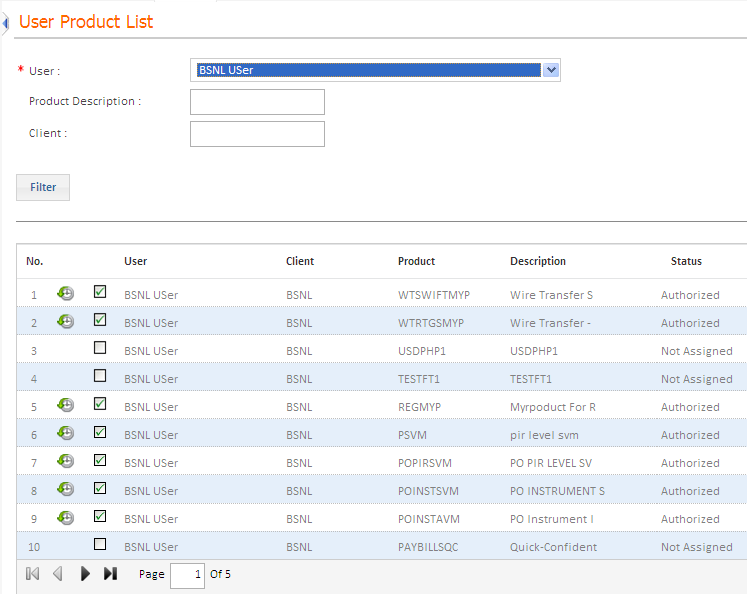
5. Click the Assign check box corresponding to the product which you want to assign to the user. The status of the record changes to New.
Note:
• If you disable a product definition that you have set up in the MyProducts master, all the corresponding user-product definitions set up for this product are automatically disabled.
• When you enable the product definition, the corresponding user-product definitions are not enabled automatically. You have to enable each of them manually.
Authorization is required for all user products which are newly setup or edited. Click here to know more about Authorizing Master Definitions.
|
© 2014 Fundtech. All rights reserved. |

