 |
Global CASHplus CashWeb |
|
Global CASHplus CashWeb |
Defining groups

This screen enables the client user to create groups of client accounts based on different regions and business process requirements. Balance reporting accounts are defined for a client in GCP. The client can further create their own groups by using this screen. Examples of client groups can be: HR, Production, Finance Department, CEO View etc.
In the application, an account can be linked to multiple groups and a group may have multiple accounts linked to it. You may specify the filter criteria to retrieve a particular group or parent group definition.
1. Click Admin in the header menu.
2. Click Account Settings >> Group Definition to open the Group List screen.
Note: You can also view the summary using the filters on this screen.
3. Click Add New Group to go to the Group Master Entry screen.
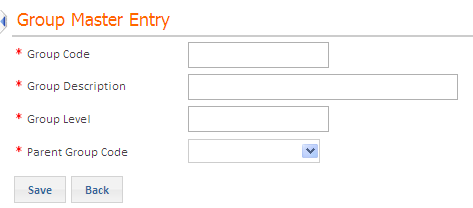
4. Specify the following group details:
· Group Code: Type a unique identification code for the group that you want to define.
· Group Description: Type a small description for the group code you are defining.
· Group Level: Type a level of group that you want to define.
· Parent Group Code: Select a unique identification code for the parent group that you want to define.
5. Click Save. The new group is added to the group list, with its status as New.
Authorization is required for all groups that are newly setup or edited. For more information, see Authorizing Master Definitions.
|
© 2014 Fundtech. All rights reserved. |

