 |
Global CASHplus CashWeb |
|
Global CASHplus CashWeb |
Defining account enrichments
Enrichments refer to the extra information that can be added to the account. These enrichments can be added through the Account enrichment feature. These enrichments are available on the balance transaction reporting (Account Activity screen).
1. Click Admin in the header menu.
2. Click A/C Settings >> Account Enrichments to display the Enrichments List summary screen with existing enrichments and statuses.
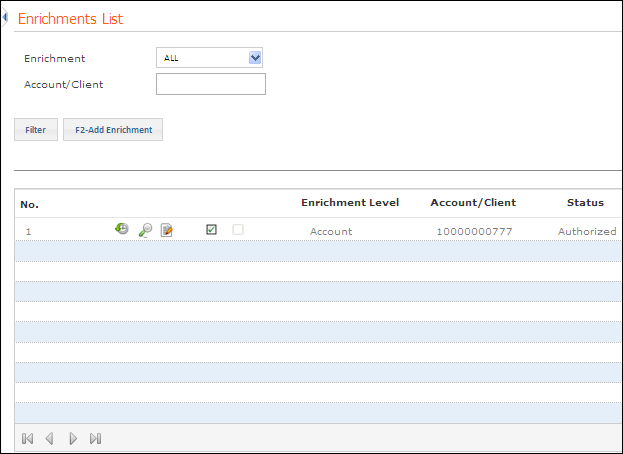
3. Select an Enrichment from drop-down list.
4. Enter a particular Account or Client and click Filter to go to a particular enrichment.
5. Click F2-Add Enrichment to open the Enrichments Entry screen.
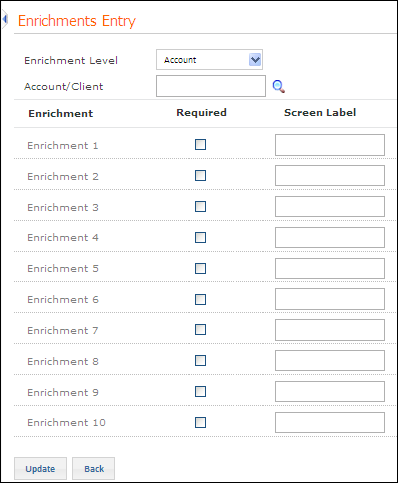
6. Select the Enrichment Level from the drop-down list. The available options are Account or Client.
7. Click  to select an Account
/ Client as per the selected
enrichment level.
to select an Account
/ Client as per the selected
enrichment level.
Note: Only users who have access across clients set up in the user master can add enrichments at the client level. Otherwise, the user can add enrichment only for the current client.
8. Select the check box for required enrichments and specify the following information for selected enrichments:
· Screen Label: Indicates the enrichment field label as you want it to appear on the screen.
9. Click Update to update the enrichments.
Authorization is required for all account names that are newly setup or edited. For more information, see Authorizing Master Definitions.
|
© 2014 Fundtech. All rights reserved. |

