 |
Global CASHplus CashWeb |
|
Global CASHplus CashWeb |
Defining account names

The Account Name screen enables you to define a preferred name for the accounts that are already defined in the Client Accounts master in the bank. The accounts listed in the Account Name screen are the accounts that are used for balance reporting.
1. Click Admin in the header menu.
2. Click A/C Settings >> Account Names to display the Account Name List screen.
Tip: You can also search for a particular account number from the search list or select a particular account usage from the drop-down list.
3. Click Edit for the account number which you want to rename. The Account Name Edit screen is displayed.
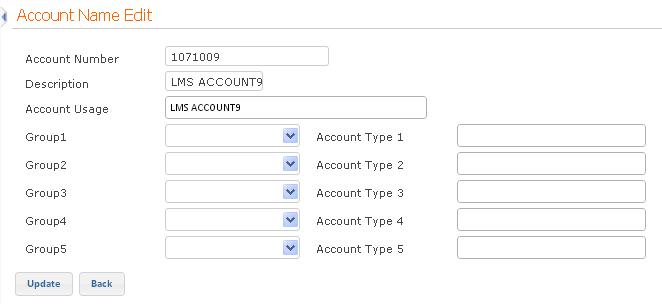
4. Specify the desired account usage and type a unique account name describing the type of account.
5. Select the group to which you want to link the account from the drop-down list. This grouping is referred to in balance reporting. Enter the account type corresponding to the group.
6. Click Update to save the information.
Authorization is required for all account names that are newly setup or edited. For more information, see Authorizing Master Definitions.
|
© 2014 Fundtech. All rights reserved. |

